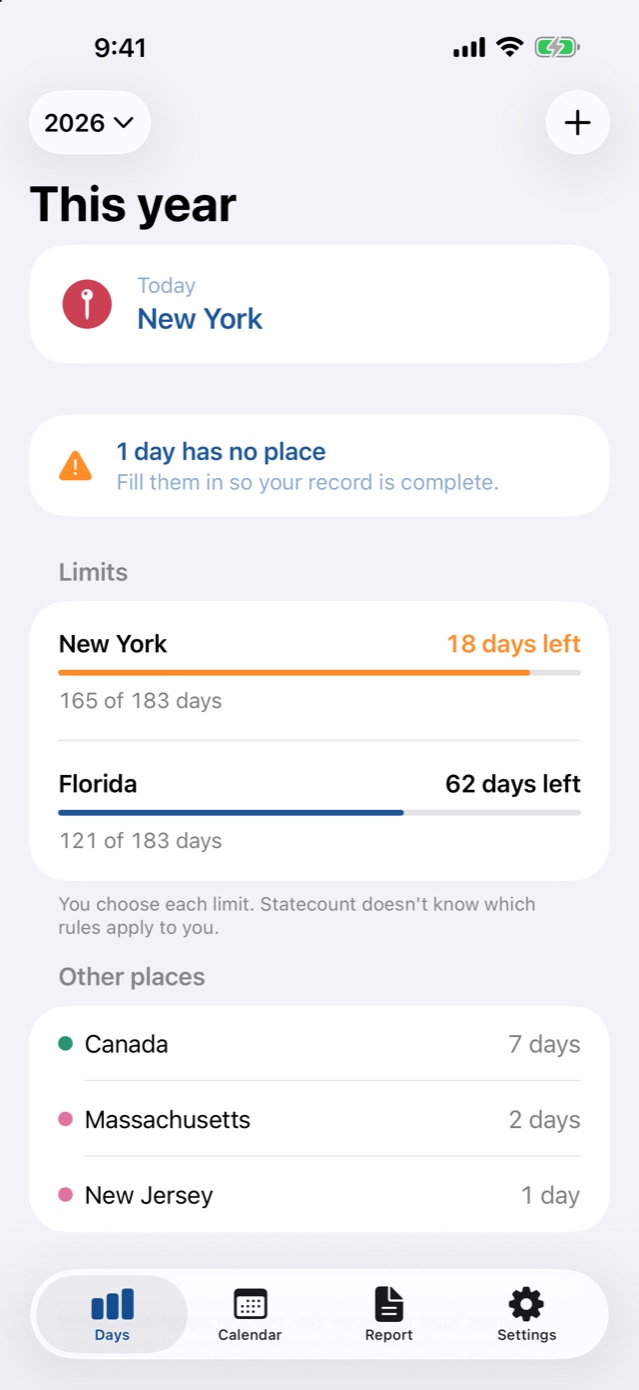
Days used, days left.
Every limit shows days used and days left, with alerts at 30, 14 and 7 days left, before you reach it.
 Coming soon
If you split your year between places, Statecount keeps a day-by-day record of where you were, and warns you before you reach a day limit you set, like 183 days.
iPhone. No account, no servers, no analytics.
Set a limit, like 183 days in New York. Statecount counts days used and days left, and gives you a heads-up at 30, 14 and 7 days left.
Example data. You choose each limit. Statecount doesn't know which rules apply to you.
Who winter in Florida, Arizona or Texas and spend the rest of the year up north.
Who work from different states through the year.
Who divide their time between two houses.
Who keep an eye on days spent in a country.
Many states and countries use the number of days you spend there to decide whether you count as a resident for tax purposes. The rules differ from place to place, and you may be asked to show where you were on particular days. Memory and a rough spreadsheet are hard to rely on. A day-by-day record, with where each entry came from, is much easier to stand behind.
Statecount keeps that record for you on your phone, tells you how many days you have left before a limit you set, and never sends your location anywhere.
Statecount doesn't know which rules apply to you. Ask a tax professional about your situation.
Every limit shows days used and days left, with alerts at 30, 14 and 7 days left, before you reach it.
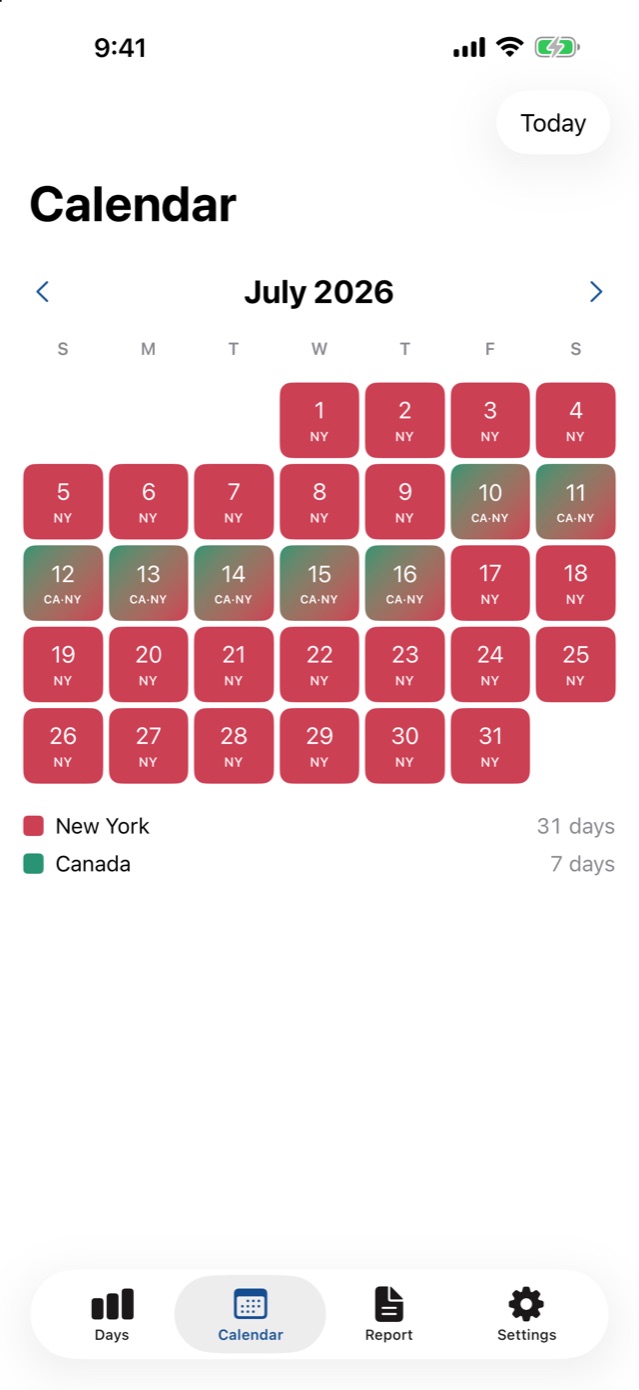
Each record shows whether it came from your phone's location or was entered or edited by you. Days with no record are flagged so you can fill them in. A week in Canada shows as Canada.
The state or country is worked out on your iPhone. No account, no servers, no analytics. Data Not Collected.
Your iPhone's location is matched against map boundaries built into the app (US Census and Natural Earth data). The app makes no network calls of its own.
Days used and days left for every limit, with alerts at 30, 14 and 7 days left.
Export every day of the year as a PDF and CSV.
Statecount works out which state or country you're in on your iPhone, each day.
Like 183 days in New York. Statecount counts days used and days left.
Alerts at 30, 14 and 7 days left, before you reach the limit.
Every day, with where the entry came from, ready to export as a PDF and CSV for your tax professional.
Coming soon to the App Store. The yearly plan renews automatically unless canceled at least 24 hours before the end of the period, managed in Settings, then your name, then Subscriptions. Prices shown in US dollars.
Your iPhone's location is matched, on the phone, against map boundaries built into the app (US Census and Natural Earth data). The app makes no network calls of its own.
No. There's no account, no server and no analytics, and the App Store privacy label is Data Not Collected. If you turn on iCloud sync, your days sync through your own private iCloud.
Statecount records every state or country you were in on each date, so a travel day shows both places. How a day counts depends on the rule. New York's tax department, for example, says any part of a day is a day. Your tax professional can tell you how a rule applies to you.
Yes. You can add or edit any day by hand. Each record shows whether it came from your phone's location or from you, and days with no record are flagged so you can fill them in.
Every day of the year and where it was recorded, exported as a PDF and a CSV you can share with your tax professional.
Statecount records countries as well as US states, so a week in Canada shows as Canada.
Yes, to log by hand with one limit for the current year. Statecount Pro is $29.99 a year with a 7-day free trial, or $59.99 once, and adds automatic logging, as many limits as you need, every year of history, widgets and alerts.
No. Statecount keeps records. It is not tax or legal advice, and it doesn't know which rules apply to you.
Small apps that each do one job well.
Coming soon to the App Store. Screenshots show example data.